Technology has changed the way people communicate, work, travel, shop, and entertain themselves. Now, it is also changing the way we live at home.
From lights that can be controlled with a smartphone to thermostats that automatically adjust the temperature, smart home technology is making everyday houses more connected and automated.
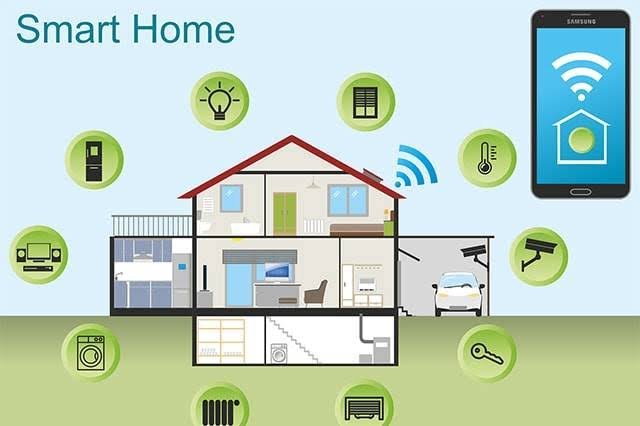
A smart home is a home equipped with connected devices that can be controlled remotely, communicate with one another, collect information, or automatically respond to different situations.
You do not need to turn your entire house into a futuristic laboratory to benefit from smart technology. Even a few carefully selected devices can make your home more convenient, energy-efficient, secure, and comfortable.
But with thousands of smart products available, where should you start?
This guide explores some of the best ways to make your home smarter and explains how different smart-home technologies work.
What Is a Smart Home?
A smart home uses connected devices and technology to automate or simplify everyday household activities.
These devices can communicate through technologies such as Wi-Fi, Bluetooth, Zigbee, Thread, and other networking standards.
Many smart devices can also connect to a central platform or ecosystem, allowing users to control them through:
- Smartphone applications
- Voice assistants
- Smart displays
- Automated schedules
- Motion sensors
- Other connected devices
For example, instead of manually turning off every light before going to bed, you could create an automation that switches off selected lights automatically.
A smart home is therefore not just about individual gadgets. The real benefit comes from making devices work together.
1. Start With Smart Lighting
Smart lighting is one of the easiest ways to begin building a smart home.
Smart bulbs and switches can allow you to control lights using a smartphone, voice command, schedule, or automation.
Depending on the product, you may be able to:
- Turn lights on and off remotely
- Adjust brightness
- Change colors
- Create schedules
- Set scenes
- Automatically turn lights on when motion is detected
For example, you could create a “Movie Night” setting that dims the living-room lights.
You could also schedule outdoor lights to turn on around sunset.
Smart lighting can be especially useful because it does not require major changes to your home.
2. Install a Smart Thermostat
A smart thermostat can make your home’s heating and cooling system more intelligent.
Traditional thermostats generally require users to manually adjust the temperature.
Smart thermostats can provide additional features such as remote control, scheduling, temperature sensing, and learning based on household patterns, depending on the model.
For example, you could adjust the temperature from your smartphone before arriving home.
Some systems can also use sensors to determine whether particular rooms are occupied.
Smart thermostats may help reduce unnecessary heating and cooling, although actual energy savings depend on the home, HVAC system, settings, climate, and how the device is used.
3. Add Smart Plugs
Smart plugs are among the simplest smart-home devices.
They plug into a standard electrical outlet and allow compatible appliances to be controlled electronically.
For example, you could connect a lamp to a smart plug and turn it on or off remotely.
Smart plugs can also be used for:
- Fans
- Coffee makers
- Lamps
- Holiday lights
- Certain small appliances
You can often create schedules so a connected device operates at specific times.
Before using a smart plug, make sure the connected appliance is compatible and that the plug is rated for its electrical load.
4. Upgrade Your Doorbell
Smart video doorbells combine a traditional doorbell with a camera and network connectivity.
Depending on the device, a smart doorbell can notify you when someone approaches your door and allow you to see or communicate with visitors through an application.
Some models can also detect movement and distinguish between different types of activity.
A smart doorbell can be particularly useful when you are away from home.
However, cameras and microphones also raise privacy considerations. Make sure your device is configured securely and that you understand where recordings are stored and who can access them.
5. Improve Home Security With Smart Cameras
Smart security cameras can provide remote monitoring of your home.
Depending on the system, you may be able to view live video through a smartphone and receive alerts when motion is detected.
Some systems offer features such as:
- Person detection
- Activity zones
- Night vision
- Two-way audio
- Cloud recording
- Local storage
A good security setup does not necessarily require cameras everywhere.
Focus on areas where monitoring provides a genuine benefit, such as entrances, driveways, or other appropriate locations.
Privacy should always be considered when installing cameras, especially if other people live in or regularly visit the home.
6. Use Smart Locks
Smart locks can provide alternatives to traditional physical keys.
Depending on the model, a smart lock may support methods such as:
- Smartphone control
- PIN codes
- Fingerprints
- Temporary access codes
- Traditional keys as a backup
One useful feature is the ability to provide temporary access.
For example, instead of giving someone a physical key, you may be able to create a temporary code that expires after a certain period.
Smart locks can also integrate with other home systems.
For example, an automation could unlock the door when you arrive, depending on the technology and security settings.
Because smart locks protect an important entry point, security should be a major consideration when choosing one.
7. Add Smart Smoke and Carbon Monoxide Detectors
Safety should be a higher priority than entertainment when building a smart home.
Connected smoke and carbon monoxide detectors can provide alerts through a smartphone in addition to traditional alarms.
This can be useful when you are away from home.
Some systems can also notify you when a device needs maintenance or when its battery is low.
However, smart features should never be considered a replacement for properly installed and maintained safety equipment.
8. Use Smart Speakers and Displays
Smart speakers can serve as convenient control centers for a smart home.
Depending on the ecosystem, users can issue voice commands to control compatible devices.
You might say:
“Turn off the living-room lights.”
Or:
“Set the thermostat to 70 degrees.”
Smart displays can go a step further by showing information such as weather, calendars, timers, cameras, recipes, and other content.
The usefulness of a smart speaker depends heavily on compatibility with your other devices.
9. Make Your Home Smarter With Sensors
Sensors are the hidden foundation of many smart-home systems.
They allow a home to detect changes in its environment.
Common sensors include:
- Motion sensors
- Door sensors
- Window sensors
- Temperature sensors
- Humidity sensors
- Water-leak sensors
- Light sensors
For example, a motion sensor could detect when someone enters a room and trigger the lights.
A water-leak sensor could notify you if it detects moisture near a washing machine or water heater.
Sensors can therefore turn a collection of smart devices into a more responsive system.
10. Install Smart Water-Leak Detection
Water damage can be expensive and difficult to repair.
Smart water sensors can detect leaks or unexpected moisture and send notifications to a smartphone.
You could place sensors near areas where leaks are more likely, such as:
- Water heaters
- Washing machines
- Sinks
- Dishwashers
- Basement plumbing
- Toilets
Some advanced systems can connect to automatic shutoff valves that stop the water supply when a significant leak is detected.
This can potentially reduce damage, although these systems should be installed and configured appropriately.
11. Upgrade Your Entertainment System
Smart-home technology can also improve entertainment.
Modern televisions and streaming devices can connect to the internet and provide access to streaming platforms, music services, games, and other digital content.
Smart speakers can also provide multi-room audio when compatible devices are connected.
For example, you could play music throughout your home or control entertainment using voice commands.
The goal should be convenience rather than adding unnecessary complexity.
12. Create Smart Home Automations
Automation is where smart-home technology becomes especially powerful.
Instead of controlling every device manually, you can create routines that perform multiple actions automatically.
For example, a “Good Morning” routine might:
- Turn on bedroom lights
- Adjust the thermostat
- Provide the weather forecast
- Start a coffee maker
- Turn off overnight security settings
A “Good Night” routine could:
- Turn off selected lights
- Lock doors
- Adjust the thermostat
- Activate security devices
- Turn off compatible appliances
Automations reduce the number of individual actions you need to perform.
13. Choose One Main Smart-Home Ecosystem
One of the biggest mistakes beginners make is buying random smart devices without checking compatibility.
A device might work with one platform but have limited support for another.
Before buying multiple products, decide which ecosystem you want to use.
The major platforms and standards available to consumers continue to evolve, and interoperability is improving.
The Matter smart-home standard is particularly important because it was designed to improve compatibility among supported devices and ecosystems.
However, not every feature is supported identically across every platform, so compatibility should still be checked before purchasing.
14. Protect Your Smart Home From Cyber Threats
A smart home is also a connected computer network.
Every connected device can introduce potential security risks.
Protect your smart home by following basic cybersecurity practices.
Use strong, unique passwords.
Enable multi-factor authentication where available.
Keep devices updated.
Secure your Wi-Fi network.
Replace devices that no longer receive important security updates.
Review which devices have access to your network.
Avoid buying unknown products that have poor security support.
Security is especially important for cameras, smart locks, and other devices that can expose sensitive information or affect physical access to your home.
15. Think About Privacy
Convenience should not come at the expense of privacy.
Smart speakers may process voice commands.
Cameras can record video.
Smart appliances may collect usage information.
Some connected devices send information to cloud services.
Before purchasing a product, consider:
- What information does it collect?
- Where is the information stored?
- Can you delete your data?
- Does the device work without cloud connectivity?
- How long does the manufacturer provide software updates?
- Who can access the information?
Understanding these questions can help you make better purchasing decisions.
16. Make Your Home More Energy Efficient
Smart-home technology can help people understand and manage energy use.
Smart plugs and energy-monitoring devices can provide information about electricity consumption.
Smart thermostats can help manage heating and cooling schedules.
Smart lighting can automatically switch off when rooms are unoccupied.
Connected appliances may provide information about their energy usage.
These features can help reduce waste, although technology alone cannot guarantee lower energy bills.
The biggest savings usually come from combining smart automation with sensible energy habits and efficient appliances.
17. Smart Appliances
Smart refrigerators, ovens, washing machines, dishwashers, and other appliances are becoming increasingly common.
Some can send notifications when a cycle is finished or when maintenance is required.
Others can be controlled remotely or integrated with smart-home systems.
However, not every appliance needs to be smart.
Before buying a connected appliance, ask whether its smart features solve a real problem.
A connected washing machine may be useful if remote notifications are valuable to you. A connected appliance with unnecessary features may simply add complexity.
18. Make Your Smart Home Accessible
Smart-home technology can also improve accessibility.
Voice commands, automated lighting, smart locks, and remote controls can make household tasks easier for people with disabilities, older adults, or anyone with mobility limitations.
For example, someone who has difficulty reaching a light switch could control lighting through voice commands or an application.
Automation can reduce the need to perform repetitive physical actions.
Accessibility is therefore an important benefit of smart-home technology that is sometimes overlooked.
How Much Does It Cost to Build a Smart Home?
The cost can vary enormously.
You can start with a single smart bulb or smart plug for a relatively small investment.
A more advanced setup involving cameras, locks, thermostats, sensors, smart appliances, and a central controller can cost considerably more.
The best approach is usually to start small.
Choose one problem you want to solve.
For example:
“I want my lights to turn on automatically.”
Buy the appropriate device, learn how it works, and then gradually expand.
This prevents you from spending money on gadgets that you ultimately do not use.
A Simple Smart Home Setup for Beginners
If you are starting from scratch, consider building your system in stages.
Stage 1: Convenience
Start with smart bulbs, smart plugs, or a smart speaker.
Stage 2: Comfort
Add a smart thermostat or environmental sensors if they make sense for your home.
Stage 3: Security
Consider a smart doorbell, security camera, smart lock, or water-leak sensors.
Stage 4: Automation
Connect devices together and create routines.
Stage 5: Optimization
Review your system and remove devices that do not provide meaningful benefits.
The objective is not to have the largest number of smart devices.
The objective is to create a home that is genuinely easier, safer, and more comfortable to live in.
The Future of Smart Homes
Smart homes are likely to become more intelligent as Artificial Intelligence, sensors, wireless networking, and automation improve.
Future systems may understand household routines more effectively and make decisions with less manual configuration.
For example, an AI-powered home could potentially understand when people are sleeping, working, relaxing, or leaving the house and adjust compatible systems accordingly.
Robots may also become more common in homes, performing tasks such as cleaning, monitoring, or assisting residents.
At the same time, privacy and cybersecurity will become increasingly important.
The more intelligent and connected a home becomes, the more important it is to protect the data and systems controlling it.
Conclusion
Smart-home technology can make everyday life more convenient, comfortable, secure, and efficient.
You do not need to replace everything in your home to get started. Smart lighting, plugs, thermostats, sensors, cameras, locks, speakers, and safety devices can each provide useful benefits.
The key is to focus on problems rather than gadgets.
Instead of asking, “What smart device should I buy?” ask, “What do I want my home to do better?”
Maybe you want to save energy. Maybe you want better security. Maybe you want easier lighting control. Maybe you want to automate repetitive tasks.
Start with one useful improvement and expand gradually.
A well-designed smart home is not necessarily the one with the most technology. It is the one where technology works quietly in the background to make everyday life simpler.