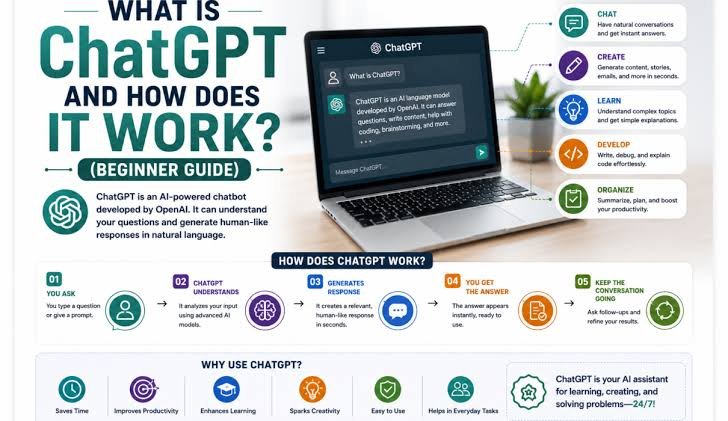
Artificial Intelligence has changed dramatically in recent years, and one of the most recognizable examples of this change is ChatGPT. Millions of people use ChatGPT to ask questions, write documents, learn new subjects, brainstorm ideas, analyze information, solve problems, and complete everyday tasks.
But what exactly is ChatGPT? How does it work? What can it do, and what are its limitations? Most importantly, how can a beginner use it effectively?
This complete beginner’s guide explains ChatGPT in simple language and explores how this technology can be used responsibly and effectively.
What Is ChatGPT?
ChatGPT is a conversational artificial intelligence assistant developed by OpenAI. It is designed to understand natural-language instructions and generate responses that help users with a wide variety of tasks.
Unlike a traditional search engine, where users usually enter keywords and receive a list of web pages, ChatGPT allows people to have a conversation. You can ask a question, receive an answer, ask a follow-up question, request a change, or provide additional information.
According to OpenAI, ChatGPT can help with tasks such as answering questions, explaining concepts, writing and rewriting content, brainstorming, translation, problem-solving, coding, and more. Depending on the plan and available features, it can also work with files and images, search the web, analyze data, use voice, and perform other tasks. OOpenAI Help Center+1
In simple terms, ChatGPT can be thought of as an AI assistant that communicates with you through conversation.
What Does the Name ChatGPT Mean?
The name “ChatGPT” combines two ideas: chat and GPT.
“Chat” refers to the conversational nature of the system. You interact with it by sending messages and receiving responses.
“GPT” refers to a family of generative AI models developed by OpenAI. These models are designed to understand and generate language.
The technology behind ChatGPT has developed considerably since the service first became widely known. Modern versions can handle much more than simple text conversations and may work with different types of information and tools.
How Does ChatGPT Work?
The technology behind ChatGPT is complicated, but the basic idea can be explained simply.
ChatGPT is powered by large language models. These models are trained using very large amounts of information and learn patterns in language. When you provide a prompt, the model processes your words and generates a response based on those learned patterns and the instructions it has been given.
For example, if you ask:
“Explain photosynthesis to a 10-year-old.”
ChatGPT identifies the subject, understands that the explanation should be simple, and produces an answer designed around that request.
It does not simply look up a pre-written answer. Instead, the model generates a response based on its understanding of language and the information available to it.
This is why the same question can sometimes receive slightly different answers.
What Is a Prompt?
A prompt is the question, instruction, or information you give ChatGPT.
For example:
- “Explain artificial intelligence in simple words.”
- “Write a professional email asking for a meeting.”
- “Give me five ideas for a birthday party.”
- “Summarize this article.”
- “Help me create a study plan for my exam.”
The quality of your prompt can have a major effect on the quality of the response.
A vague prompt such as “Write something about technology” gives ChatGPT very little direction.
A more specific prompt such as “Write a 1,000-word beginner-friendly article about how artificial intelligence is changing education, using simple English and clear headings” provides much more useful guidance.
One of the easiest ways for beginners to get better results is therefore to become more specific about what they want.
What Can ChatGPT Do?
ChatGPT can be used for an enormous range of tasks. Its capabilities continue to evolve, and available features can vary depending on the plan, platform, and settings. OOpenAI Help Center
1. Answer Questions
You can ask ChatGPT questions about subjects such as history, science, technology, mathematics, literature, business, and many other areas.
For example, a student might ask:
“Why does the Earth have seasons?”
ChatGPT can provide an explanation and answer follow-up questions.
2. Help With Writing
ChatGPT can help users draft, rewrite, summarize, edit, and improve written material.
It can assist with:
- Essays
- Articles
- Emails
- Reports
- Blog posts
- Social media posts
- Business documents
- Speeches
- Stories
You can also tell it what tone you want, such as professional, friendly, persuasive, formal, or conversational.
3. Support Learning
Students can use ChatGPT as a learning assistant. It can explain difficult concepts, create practice questions, provide examples, and help organize study materials.
Instead of simply asking for an answer, students can ask ChatGPT to explain why an answer is correct.
For example:
“Teach me basic algebra step by step and give me five practice problems.”
This encourages learning rather than simply copying an answer.
4. Brainstorm Ideas
ChatGPT can be useful when you have an idea but do not know where to begin.
You can ask it to generate:
- Business ideas
- Article topics
- Names
- Marketing ideas
- Travel plans
- Project ideas
- Creative concepts
- Presentation topics
You can then evaluate and improve those ideas yourself.
5. Summarize Information
ChatGPT can summarize long passages of text and, where supported, analyze uploaded documents and files. OpenAI’s current documentation lists file analysis and document-related capabilities among ChatGPT’s available features. OOpenAI Help Center
For example, you could provide a long report and ask:
“Summarize this in five key points.”
You could then ask follow-up questions about specific sections.
6. Analyze Data
Depending on the features available to you, ChatGPT can work with structured data such as spreadsheets and CSV files. It can help identify patterns, summarize results, create tables, and produce visualizations. OOpenAI Help Center
This can be useful for students, researchers, business owners, and professionals.
7. Help With Coding
ChatGPT can explain programming concepts, help write code, identify potential bugs, and assist with software-development tasks.
A beginner might ask:
“Explain what a Python function is and show me a simple example.”
A more experienced developer could provide code and ask for help understanding or improving it.
8. Work With Images and Other Inputs
Depending on available features, ChatGPT can analyze uploaded images, diagrams, screenshots, and charts. Users can ask questions about visual information or request help interpreting what an image contains. OOpenAI Help Center
This makes ChatGPT useful beyond traditional text-based conversations.
9. Search the Web
ChatGPT can also search the web in supported experiences when current information is needed. This is especially useful for topics that change frequently, such as current events, recent developments, or up-to-date information. Search can also provide cited sources. OOpenAI Help Center+1
This distinction is important because not every answer necessarily requires web searching. For timeless questions, a normal explanation may be enough. For current information, checking recent sources is much more useful.
10. Have Voice Conversations
ChatGPT also supports voice interaction in supported experiences. Instead of typing every question, users can speak naturally and receive spoken responses. OOpenAI+1
This can be useful while walking, multitasking, practicing a language, brainstorming ideas, or simply having a more natural conversation.
How Do Beginners Start Using ChatGPT?
Getting started is simple.
Open ChatGPT and enter a prompt in the message box. Your prompt can be a question, instruction, or description of what you need.
For example:
“Help me plan a weekly study schedule.”
ChatGPT will provide a response. You can then continue the conversation.
For example, you could say:
“I only have two hours each evening.”
Then:
“Make the schedule more suitable for a beginner.”
ChatGPT can use the context of the conversation to refine its response. OpenAI recommends starting with a clear prompt and then refining the request by adding information or asking follow-up questions. OOpenAI
How to Write Better Prompts
Good prompting does not require complicated technical language. The most useful approach is usually to explain exactly what you need.
A strong prompt often includes four things:
Goal: What do you want?
Context: What information does ChatGPT need?
Format: How should the answer be presented?
Tone: How should it sound?
For example, instead of saying:
“Write an article about AI.”
You could say:
“Write a 1,500-word beginner-friendly article about artificial intelligence. Use simple English, clear headings, real-world examples, and a balanced discussion of benefits and risks.”
The second prompt gives ChatGPT much more direction.
Can ChatGPT Make Mistakes?
Yes. This is one of the most important things beginners need to understand.
ChatGPT can produce answers that sound confident and convincing but are incorrect. AI-generated information should therefore not automatically be treated as fact.
OpenAI’s documentation specifically warns that ChatGPT can produce inaccurate or misleading information. OOpenAI Help Center
This is particularly important for medical, legal, financial, academic, and other high-stakes information.
When accuracy is important, verify important claims using reliable sources. If the information is current, ask ChatGPT to search the web and provide sources when that feature is available.
Is ChatGPT a Search Engine?
ChatGPT and search engines are different tools, although ChatGPT can now search the web in supported experiences.
A search engine is primarily designed to help users discover websites and information online. ChatGPT is primarily designed for conversation, reasoning, writing, explanation, and task assistance.
For example, if you want to find the official website of a company, a search engine may be ideal.
If you want someone to explain a complicated topic in simple language, help you organize your thoughts, or rewrite something you have written, ChatGPT may be more useful.
When current information is required, ChatGPT’s web-search capabilities can combine conversational assistance with up-to-date online information. OOpenAI Help Center
Is ChatGPT Free?
ChatGPT has a free tier, while OpenAI also offers paid plans with additional capabilities and higher limits. The exact features, limits, and model availability can change over time. OOpenAI Help Center
This means that beginners can start using ChatGPT without necessarily paying for a subscription.
For users who need more advanced capabilities, higher limits, or additional tools, paid plans may provide additional options.
ChatGPT and Privacy
Privacy is another important consideration.
Users should be careful about sharing sensitive personal information with any online AI service. Avoid entering passwords, financial account details, confidential business information, or other highly sensitive data unless you understand how that information is handled and have an appropriate reason to provide it.
ChatGPT also provides privacy-related controls. For example, OpenAI’s current documentation describes Temporary Chat, which does not appear in chat history and does not use or create memories. OOpenAI Help Center
Users should review the current privacy and data-control settings available in their account.
What Are Custom GPTs?
ChatGPT can also include specialized versions known as GPTs or custom GPTs.
These are versions of ChatGPT configured for particular purposes. They can contain specific instructions, knowledge, and selected capabilities.
For example, a specialized GPT might be designed to help with writing, education, business processes, or another particular task. OOpenAI Help Center
This allows people to create or use more specialized AI assistants instead of starting every conversation from scratch.
Will ChatGPT Replace Humans?
ChatGPT is powerful, but it is not a complete replacement for human intelligence.
AI can generate text quickly, analyze information, recognize patterns, and assist with many tasks. Humans, however, provide personal experience, judgment, emotions, ethical reasoning, responsibility, and real-world understanding.
The most useful approach is often to think of ChatGPT as an assistant rather than an unquestionable authority.
For example, a writer can use ChatGPT to brainstorm ideas but still decide what to write. A student can use it to understand a difficult concept but still study and practice. A programmer can use it to explore a solution but still review and test the code.
The person remains responsible for important decisions.
Tips for Using ChatGPT Effectively
Beginners can get better results by following a few simple principles:
- Be specific. Clearly explain what you want.
- Provide context. Tell ChatGPT who the answer is for and why you need it.
- Specify the format. Ask for a list, table, article, email, explanation, or another format.
- Ask follow-up questions. You do not have to create a perfect prompt immediately.
- Request revisions. Ask ChatGPT to make an answer shorter, clearer, more detailed, or more professional.
- Verify important information. AI can make mistakes.
- Protect sensitive information. Think carefully before sharing private or confidential data.
- Use AI as a tool. Your own judgment and critical thinking remain important.
The Future of ChatGPT
ChatGPT is likely to continue becoming more capable and more deeply integrated into everyday activities.
The technology is moving beyond simple question-and-answer conversations toward systems that can work with files, images, data, voice, web information, and more complex tasks. OpenAI’s current documentation also describes newer workflows in which ChatGPT can assist with larger, more involved tasks and create finished outputs. OOpenAI Help Center
This could change how people work and learn.
Instead of opening separate applications for every small task, people may increasingly use AI assistants as a central interface for researching information, organizing ideas, creating documents, analyzing data, and completing workflows.
However, the most important part of this future will not simply be how powerful AI becomes. It will also be how responsibly people use it.
Conclusion
ChatGPT is a conversational AI assistant that can help people answer questions, learn, write, brainstorm, analyze information, solve problems, code, and complete many other tasks.
For beginners, the easiest way to understand ChatGPT is to think of it as a flexible digital assistant. You tell it what you need, it provides a response, and you can continue the conversation to improve the result.
The key to using ChatGPT effectively is not simply knowing what buttons to press. It is learning how to communicate clearly with AI, provide useful context, evaluate its answers, and recognize its limitations.
ChatGPT can save time and help people become more productive, but it should not replace human judgment. The best results come when people combine the speed and capabilities of AI with their own knowledge, creativity, critical thinking, and responsibility.
As artificial intelligence continues to develop, understanding tools like ChatGPT will become an increasingly valuable skill. For beginners, there is no need to learn everything at once. Start with simple questions, experiment with different prompts, ask follow-up questions, and gradually discover how AI can help you in your own work and everyday life.