The internet has become an essential part of everyday life. People use websites and apps to communicate with friends, shop for products, manage their finances, study, work, watch videos, and access important services.
But there is something happening behind many of these activities that users may not always notice: data is being collected.
Websites, applications, companies, advertisers, and online services may collect information about how people use their products. Some information is provided directly by users, while other information can be collected automatically.
This makes data privacy an increasingly important issue.
Data privacy is about understanding what information is collected about you, how it is used, who can access it, how long it is stored, and what choices you have over that information.
Fortunately, protecting your privacy online does not require becoming a technology expert. A few good habits can significantly reduce unnecessary exposure.
This beginner-friendly guide explains what data privacy means and provides practical ways to protect your personal information online.
What Is Data Privacy?
Data privacy refers to the proper handling and control of personal information.
Personal data can include many different types of information, such as:
- Name
- Email address
- Phone number
- Home address
- Location information
- Online activity
- Purchase history
- Photos
- Financial information
- Account information
- Device information
Some information may be particularly sensitive, including financial records, government identification information, health information, biometric data, and authentication credentials.
Data privacy is not simply about hiding everything.
It is about having appropriate control over personal information and understanding how organizations collect, use, store, and share it.
Data Privacy vs. Data Security
The terms data privacy and data security are closely related but different.
Data privacy focuses on how information is collected, used, shared, and managed.
Data security focuses on protecting information from unauthorized access, theft, loss, or destruction.
For example, imagine an online shopping company.
Privacy questions might include:
“Why does the company need my location?”
“Does it share my information with advertisers?”
“How long does it keep my purchase history?”
Security questions might include:
“Is customer information encrypted?”
“Can hackers access the database?”
Both privacy and security are important.
A company can have strong security while still collecting more information than users expect. Similarly, a company may have a privacy-friendly policy but poor security practices.
What Kind of Data Is Collected Online?
Different websites and applications collect different types of information.
Information You Provide
You may voluntarily provide information when creating an account, purchasing something, completing a form, or contacting a company.
This could include your name, email address, phone number, or payment information.
Information Collected Automatically
Websites and apps can also collect information automatically.
Depending on the service and your settings, this can include:
- IP address
- Device type
- Browser information
- Approximate location
- Pages visited
- Time spent on a website
- Interaction history
- Diagnostic information
Information From Other Sources
Some organizations may combine information from multiple sources.
For example, information from an account could potentially be combined with information about interactions with a website or other services.
The exact practices depend on the organization, technology, laws, and permissions involved.
Why Do Companies Collect Data?
There are many legitimate reasons companies collect information.
Providing Services
A company needs some information to create accounts, process purchases, deliver products, or provide requested services.
Improving Products
Usage information can help developers understand which features people use and where problems occur.
Personalization
Some services use information to customize recommendations, search results, or other experiences.
Security
Data can sometimes be used to detect suspicious activity, prevent fraud, and protect accounts.
Advertising
Some companies use data to personalize advertisements or measure advertising performance.
The important question is not simply whether a company collects data.
It is what data is collected, why it is collected, and how it is used.
Why Does Data Privacy Matter?
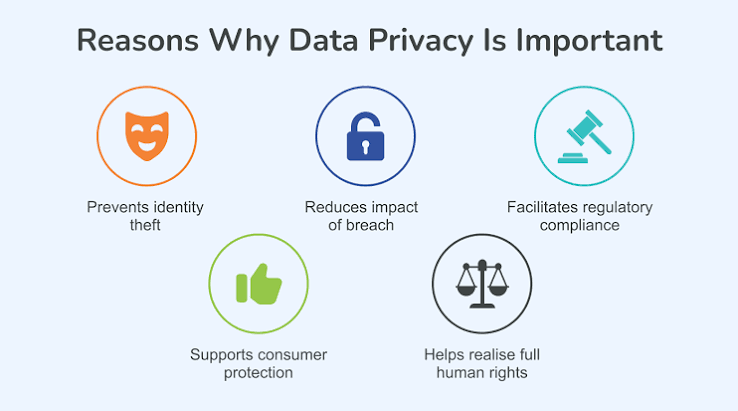
Privacy matters because personal information can reveal a great deal about an individual.
Consider how much information might be connected to an ordinary online account:
- What you buy
- What you search for
- Where you go
- Who you communicate with
- Which websites you visit
- What content you watch
- What services you use
When combined, seemingly harmless pieces of information can create a detailed picture of someone’s activities and interests.
Poor privacy practices can also increase the risks of identity theft, fraud, unwanted tracking, targeted scams, and other forms of misuse.
Privacy is therefore not only about secrecy. It is also about maintaining control over your digital life.
1. Use Strong, Unique Passwords
One of the simplest ways to improve online privacy and security is to use strong, unique passwords.
Avoid using the same password for multiple accounts.
If one service suffers a data breach and your password is exposed, attackers may attempt to use the same credentials on other websites.
A better approach is to use a different password for every important account.
Because remembering dozens of passwords can be difficult, a reputable password manager can generate and securely store unique passwords.
2. Enable Multi-Factor Authentication
Multi-factor authentication (MFA) adds another layer of protection to your accounts.
Instead of relying only on a password, MFA may require another verification method.
Depending on the service, this could involve:
- An authentication app
- A security key
- A verification code
- A biometric method
Even if someone obtains your password, an additional authentication factor can make unauthorized access more difficult.
Enable MFA on important accounts whenever it is available, especially email, financial, cloud-storage, and social-media accounts.
3. Be Careful About What You Share
One of the most effective privacy strategies is also one of the simplest:
Do not share information unless you have a reason to share it.
Before posting something publicly, consider whether you would be comfortable with that information remaining available for a long time.
Be especially careful with:
- Home addresses
- Phone numbers
- Travel plans
- Identification documents
- Financial information
- Private conversations
- Sensitive photographs
Information posted online can sometimes be copied or redistributed even after the original post is deleted.
4. Review App Permissions
Smartphones and computers allow applications to request access to various types of information.
An app may ask for access to:
- Location
- Camera
- Microphone
- Contacts
- Photos
- Files
- Bluetooth
- Notifications
Do not automatically approve every request.
Ask yourself:
Does this app actually need this permission to perform its main function?
For example, a navigation app may reasonably need location access. A simple calculator may not need access to your contacts.
Review permissions periodically and disable unnecessary access.
5. Check Privacy Settings
Many websites and apps provide privacy controls.
These may allow you to adjust:
- Location sharing
- Advertising preferences
- Profile visibility
- Search history
- Activity tracking
- Personalized recommendations
- Data-sharing settings
Privacy settings are often updated or moved as services change, so it is worth reviewing them periodically.
Do not assume that the default settings are automatically the most privacy-friendly.
6. Be Careful With Public Wi-Fi
Public Wi-Fi can be convenient, but you should still use caution when connecting to unfamiliar networks.
Avoid entering sensitive information on networks you do not trust, particularly if the website or application does not use strong security.
Make sure your device is updated and protected with a strong login method.
A VPN, or virtual private network, can encrypt network traffic between your device and the VPN service, but it is not a complete privacy solution.
A VPN provider can still potentially see or log information depending on its policies and technology.
Therefore, choosing a trustworthy provider and understanding what a VPN actually does is important.
7. Recognize Phishing Attempts
Phishing is a common technique used to trick people into revealing information.
A phishing message might pretend to come from a bank, delivery company, employer, social network, or other organization.
It may claim:
“Your account will be closed.”
“Your payment failed.”
“Click here to verify your identity.”
The goal is often to make you click a malicious link or provide sensitive information.
Before clicking a link, examine the message carefully.
Watch for:
- Unexpected requests
- Urgent language
- Suspicious links
- Unusual sender addresses
- Requests for passwords
- Requests for financial information
When in doubt, visit the organization’s official website directly instead of clicking the message’s link.
8. Keep Your Software Updated
Software updates often include important security fixes.
This applies to:
- Smartphones
- Computers
- Browsers
- Applications
- Routers
- Smart-home devices
Enable automatic updates when practical.
Using outdated software can expose devices to vulnerabilities that have already been fixed by the manufacturer.
9. Secure Your Home Wi-Fi
Your home Wi-Fi network connects many devices to the internet.
Protect it with a strong password and modern security settings supported by your router.
Change default administrative credentials when appropriate.
Keep the router’s firmware updated.
If your router supports a guest network, consider using it for visitors or certain less-trusted devices.
A secure home network creates an important foundation for protecting connected devices.
10. Be Careful With Social Media
Social media can reveal more information than people realize.
A single profile might reveal:
- Your full name
- Workplace
- Family members
- Location
- Hobbies
- Travel plans
- Daily routines
Review your privacy settings and think carefully about what you publish publicly.
Avoid sharing information that could help someone guess passwords, security questions, or other sensitive details.
For example, publicly posting the name of your first pet may not seem dangerous, but if that information is also used as a security question, it becomes relevant to account security.
11. Limit Location Sharing
Location information can be particularly sensitive.
Many apps request location access for useful features, but not every application needs continuous access.
Where possible, choose the least amount of location access necessary.
For example, some applications may only need your location while you are actively using them.
Review location permissions regularly, particularly after installing new applications.
12. Delete Accounts You No Longer Use
Old online accounts can contain personal information that you have forgotten about.
If you no longer use a service, consider whether you can delete the account.
This can reduce the amount of information sitting in old databases.
However, remember that deleting an account does not necessarily mean every historical copy of information disappears immediately. Organizations may have legal, operational, backup, or other reasons for retaining certain records.
13. Be Careful With Browser Cookies and Tracking
Cookies are small pieces of information websites can store in your browser.
Some cookies are necessary for websites to function.
Others can be used for preferences, analytics, advertising, or tracking.
Modern browsers provide various privacy controls that can help users manage cookies and other tracking technologies.
You can also review site permissions and clear stored browsing data when appropriate.
However, blocking every cookie can sometimes cause websites to stop working correctly.
The goal is to find a balance between functionality and privacy.
14. Think Before Using Free Online Services
Many online services are free to use.
But “free” does not necessarily mean that the service does not collect information.
Before uploading personal or sensitive information to an online tool, consider:
- What information am I providing?
- How will it be used?
- Is the service trustworthy?
- Can I delete my information?
- Is the information necessary for the service?
This is especially important when using online tools to process documents, photographs, or other personal material.
15. Protect Your Email Account
Your email account is one of the most important accounts you own.
Why?
Because it is often connected to other accounts.
If someone gains access to your email, they may be able to reset passwords for other services.
Use a strong, unique password and enable MFA.
Review account-recovery options and security alerts.
Be cautious about unexpected emails asking you to provide login information.
16. Protect Financial Information
Never casually share financial information online.
Use reputable websites and applications when making purchases or managing financial accounts.
Check the website address carefully before entering payment information.
Monitor your financial accounts for unusual activity.
If you suspect that your financial information has been compromised, contact the relevant financial institution through an official channel.
17. Understand Privacy Policies
Privacy policies can be long and difficult to read.
You do not necessarily need to study every paragraph, but it is useful to understand the basics.
Look for information about:
- What data is collected
- Why it is collected
- Who receives it
- How long it is retained
- Whether it is used for advertising
- Your available privacy choices
Understanding these policies can help you make more informed decisions about which services you use.
Privacy Is a Habit, Not a One-Time Task
Online privacy is not something you set up once and forget.
Technology changes.
Applications add new features.
Companies change policies.
New devices connect to your network.
New threats emerge.
That means privacy should be treated as an ongoing habit.
Every few months, review your important accounts, app permissions, privacy settings, connected devices, and passwords.
A short privacy check can prevent problems later.
A Simple Online Privacy Checklist
If you want to improve your privacy today, start with these steps:
- Use unique passwords for important accounts.
- Use a password manager.
- Enable multi-factor authentication.
- Review app permissions.
- Limit unnecessary location access.
- Check social-media privacy settings.
- Keep devices and applications updated.
- Be cautious with suspicious emails and messages.
- Avoid sharing sensitive information publicly.
- Secure your home Wi-Fi.
- Delete accounts you no longer need.
- Think carefully before uploading personal information.
- Review important privacy settings regularly.
You do not need to complete everything at once.
Start with your email, financial accounts, and other accounts containing sensitive information.
The Future of Data Privacy
Data privacy will become even more important as technology becomes more integrated into everyday life.
Artificial Intelligence, smart-home devices, wearable technology, connected cars, digital assistants, and online services can generate and process enormous amounts of information.
This creates new opportunities but also new privacy challenges.
Governments are introducing and updating privacy regulations in different parts of the world. Companies are also developing new privacy and security technologies.
Consumers will increasingly need to understand how their information is being used.
Privacy awareness may eventually become as important as basic digital literacy.
Conclusion
Data privacy is about having appropriate control and understanding over your personal information.
Every time you create an account, install an application, make an online purchase, use a connected device, or share something on social media, you may be creating or sharing digital information.
You cannot completely eliminate data collection from modern life, and trying to do so may not be practical.
Instead, the goal should be to reduce unnecessary exposure and make informed choices.
Use strong and unique passwords, enable multi-factor authentication, review permissions, keep your software updated, be careful with links and messages, and think before sharing personal information.
Most importantly, remember that online privacy is not only a technical issue. It is a matter of personal control.