In today’s digital world, technology has become an essential part of everyday life. People use smartphones, computers, online banking, social media, cloud services, shopping websites, and countless digital applications every day. Businesses and organizations also depend on technology to store information, communicate with customers, and operate their services.
However, greater dependence on technology also creates greater risks. Cybercriminals can attempt to steal personal information, break into accounts, spread malicious software, or trick people into revealing sensitive information. This is why cybersecurity has become increasingly important.
Cybersecurity is not only a concern for large technology companies or government organizations. It affects everyone who uses a connected device or online service. Understanding basic cybersecurity principles can help people protect their information and reduce the chances of becoming a victim of cybercrime.
What Is Cybersecurity?
Cybersecurity is the practice of protecting computers, smartphones, networks, applications, systems, and digital information from unauthorized access, attacks, damage, or disruption.
In simple terms, cybersecurity is about keeping digital information and systems safe.
Cybersecurity covers many different areas, including:
Protecting personal accounts
Securing computer networks
Preventing malware infections
Protecting financial information
Securing websites and applications
Detecting suspicious activity
Protecting business information
Responding to cyberattacks
Cybersecurity is a continuous process. New technologies create new opportunities, but they can also create new vulnerabilities. As cybercriminals develop new techniques, individuals and organizations must continually improve their security practices.
Why Is Cybersecurity Important?
People store enormous amounts of valuable information online. This can include names, addresses, photographs, passwords, financial information, work documents, medical information, and private conversations.
If criminals gain access to this information, they may use it for fraud, identity theft, blackmail, financial theft, or other harmful activities.
Businesses also face significant risks. A successful cyberattack can expose customer information, interrupt operations, damage a company’s reputation, and result in significant financial losses.
Cybersecurity is therefore important for three major reasons: confidentiality, integrity, and availability.
Confidentiality means that information should only be accessible to authorized people.
Integrity means that information should not be changed or manipulated without authorization.
Availability means that systems and information should remain accessible when legitimate users need them.
These three principles form the foundation of information security.
Common Types of Cyber Threats
Understanding common threats is one of the best ways to improve cybersecurity.
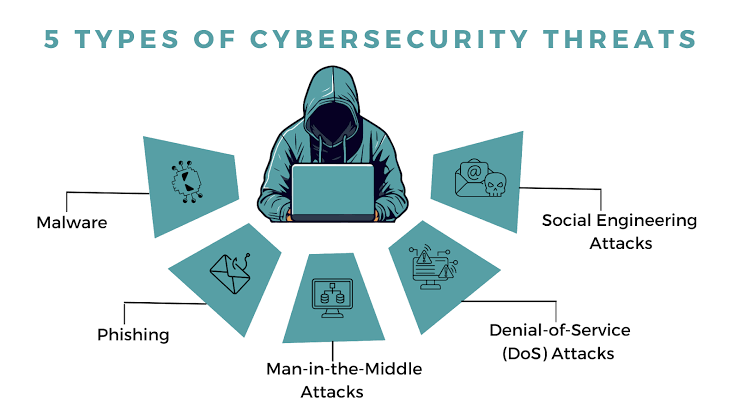
Phishing
Phishing is one of the most common forms of cybercrime. It involves using fake emails, text messages, websites, or other communications to trick people into providing sensitive information.
For example, a criminal might send a message pretending to be from a bank and claim that the recipient needs to verify their account. The message may contain a link to a fake website designed to steal the person’s username and password.
Phishing messages can sometimes look extremely convincing. They may use company logos, professional-looking designs, and urgent language.
The safest approach is to avoid clicking suspicious links and independently visit the organization’s official website or application when checking an account.
Malware
Malware is malicious software designed to damage systems, steal information, monitor activity, or provide unauthorized access.
Common types of malware include viruses, worms, trojans, spyware, and ransomware.
Malware can enter a device through malicious downloads, compromised websites, infected attachments, or deceptive messages.
Keeping software updated and avoiding suspicious downloads can significantly reduce the risk.
Ransomware
Ransomware is a type of malware that can prevent users from accessing files or systems and demand payment in exchange for restoring access.
Businesses, hospitals, schools, and individuals can all potentially be targeted.
One of the most important defenses against ransomware is maintaining reliable backups. If important files are backed up securely, an organization or individual may be able to recover without depending entirely on the attacker.
Password Attacks
Weak or reused passwords can make accounts vulnerable.
If someone uses the same password across multiple websites and one website suffers a data breach, attackers may try the stolen password on other services.
This is why using unique passwords for important accounts is essential.
Social Engineering
Cybercriminals do not always attack technology directly. Sometimes they attack people.
Social engineering involves manipulating individuals into revealing information or performing actions that compromise security.
For example, an attacker might pretend to be a company employee, technical-support worker, bank representative, or colleague.
The best defense is to slow down and verify unusual requests, particularly requests involving money, passwords, authentication codes, or confidential information.
How to Protect Your Data
Fortunately, individuals can take several simple steps to improve their cybersecurity.
- Use Strong and Unique Passwords
A strong password should be difficult to guess. More importantly, important accounts should have unique passwords.
Instead of using the same password everywhere, use different passwords for different services.
A password manager can help generate and securely store unique passwords so that users do not have to memorize every one.
Avoid passwords based on easily discoverable information such as birthdays, names, addresses, or common words.
- Turn On Multi-Factor Authentication
Multi-factor authentication, commonly called MFA, adds an additional security layer to an account.
Instead of requiring only a password, an account may also require a verification code, authentication app, security key, or another form of confirmation.
This is extremely useful because even if an attacker obtains your password, they may still be unable to access the account without the additional authentication factor.
Enable MFA whenever it is available, especially for email, banking, cloud storage, social media, and other important accounts.
- Keep Software Updated
Software updates do more than introduce new features. They often contain security fixes for vulnerabilities that attackers could exploit.
This applies to:
Operating systems
Smartphones
Web browsers
Applications
Routers
Smart devices
Security software
Turning on automatic updates where appropriate can make this process easier.
Delaying updates indefinitely can leave devices exposed to known security problems.
- Be Careful With Emails and Messages
Do not automatically trust every email, text message, or social media message you receive.
Before clicking a link or opening an attachment, consider:
Who sent it?
Were you expecting it?
Does the message create unusual urgency?
Is the sender’s address legitimate?
Is it asking for sensitive information?
Does the link lead to the correct website?
If something seems suspicious, verify it through another method.
For example, if someone sends a message claiming to be your bank, do not use the link in the message. Open your banking application directly instead.
- Back Up Important Data
Backups are one of the most effective defenses against data loss.
Important files should be backed up regularly. Depending on the situation, people can use external storage, cloud backups, or other secure backup solutions.
A good backup strategy should consider what would happen if your primary device were lost, stolen, damaged, or infected.
Backups are especially important for photographs, documents, school projects, business records, and other information that would be difficult or impossible to replace.
- Secure Your Wi-Fi Network
Your home Wi-Fi network connects multiple devices to the internet, so it should be protected.
Use a strong Wi-Fi password and keep your router’s software updated. Change default administrator credentials when appropriate.
When using public Wi-Fi, be cautious when accessing sensitive accounts. Avoid performing highly sensitive activities on networks you do not trust unless you have appropriate security protections in place.
- Protect Your Smartphone
Smartphones contain enormous amounts of personal information. They may contain photographs, messages, contacts, banking applications, email accounts, social media accounts, and authentication tools.
Use a screen lock such as a strong PIN, password, or biometric authentication.
Keep the operating system and applications updated, and only install applications from trustworthy sources.
If your phone is lost or stolen, account and device security features can help prevent unauthorized access.
- Be Careful About What You Share Online
Information posted online can sometimes be used by criminals to target individuals.
Avoid unnecessarily sharing sensitive information such as your home address, personal identification details, travel plans, or other information that could be misused.
Social media privacy settings can help control who can see certain information, but users should remember that anything shared online can potentially be copied or redistributed.
Think before posting.
- Protect Your Email Account
Your email account is especially important because it is often connected to other accounts.
If a criminal gains access to your email, they may be able to reset passwords for other services.
Use a unique password and multi-factor authentication for your primary email account.
Check account-recovery options regularly and make sure they are current.
- Learn to Recognize Scams
Cybersecurity is not only about technology. Awareness is equally important.
Be suspicious of messages that demand immediate action, promise unrealistic rewards, threaten consequences, or request sensitive information.
Common warning signs include:
Unexpected requests for money
Urgent demands for passwords
Suspicious links
Unexpected attachments
Requests for authentication codes
Offers that seem too good to be true
Messages claiming that an account will immediately be closed
When in doubt, stop and verify.
Cybersecurity in the Workplace
Cybersecurity is particularly important for businesses because employees often have access to valuable company information.
Organizations should provide cybersecurity training, establish clear security policies, use appropriate access controls, protect devices, maintain backups, monitor systems, and prepare incident-response plans.
Employees also play an important role.
A single successful phishing attack can potentially compromise an entire organization. Therefore, employees should know how to recognize suspicious messages and report security incidents quickly.
Businesses should also follow the principle of least privilege, meaning that users should receive only the access they need to perform their jobs.
Artificial Intelligence and Cybersecurity
Artificial Intelligence is creating new opportunities in cybersecurity.
Security teams can use AI to analyze enormous amounts of data, detect unusual behavior, identify potential threats, and assist with incident response.
However, AI can also be used by cybercriminals. Attackers may use AI to generate convincing phishing messages, automate certain activities, or create more sophisticated scams.
This means that AI is becoming both a security tool and a potential source of new security challenges.
As AI becomes more common, cybersecurity professionals will need to develop new ways of detecting and responding to AI-assisted attacks.
What Should You Do If Your Account Is Hacked?
If you believe an account has been compromised, act quickly.
First, change the password from a trusted device. If the same password was used elsewhere, change it on those services as well.
Next, enable multi-factor authentication if it was not already enabled.
Check the account for unfamiliar activity, devices, transactions, or changes to recovery information.
If financial information may have been compromised, contact the relevant financial institution through its official contact channels.
You should also report serious incidents to the appropriate service or organization and preserve relevant evidence, such as suspicious messages or transaction records.
The Future of Cybersecurity
Cybersecurity will become even more important as society becomes increasingly dependent on connected technology.
Smart homes, connected vehicles, cloud services, artificial intelligence, digital payments, wearable devices, and other technologies all create new opportunities—and new security challenges.
Organizations will increasingly need to build security into products from the beginning rather than treating it as an afterthought.
Individuals will also need to develop stronger digital-security habits.
The future of cybersecurity will involve advanced technologies, but many successful attacks will continue to depend on simple human mistakes. This means awareness and education will remain just as important as sophisticated security software.
Conclusion
Cybersecurity is the practice of protecting digital systems, devices, networks, and information from threats. In a world where so much of our personal and professional lives takes place online, cybersecurity is no longer optional.
The good news is that many effective security practices are simple. Use strong and unique passwords, enable multi-factor authentication, keep software updated, be cautious with suspicious messages, back up important files, protect your devices, and think carefully before sharing sensitive information.
No security system can guarantee that every attack will be prevented. However, good cybersecurity habits can significantly reduce risk and limit the damage when something goes wrong.
Ultimately, cybersecurity is a shared responsibility. Technology companies must build safer systems, organizations must protect their networks and information, and individuals must develop good digital habits.
By understanding common cyber threats and taking practical steps to protect personal information, everyone can become better prepared for the challenges of the digital world.