The way people store, access, and use information has changed dramatically over the past few decades. In the past, businesses and individuals often depended on physical computers, hard drives, CDs, USB drives, and servers located in their own buildings. Today, much of the world’s digital information and computing activity takes place through the cloud.
Cloud computing has become an essential part of modern technology. Every time you save a photo online, stream a movie, use an online email service, store a document in a cloud drive, or use a web-based application, you may be using cloud computing.
But what exactly is cloud computing? How does it work? Why do businesses use it, and what are its advantages and disadvantages?
This beginner’s guide explains cloud computing in simple terms and explores why it has become such an important part of the digital world.
What Is Cloud Computing?
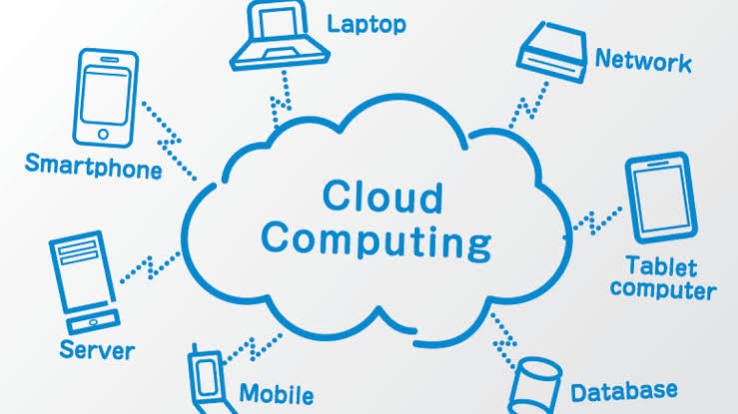
Cloud computing is the delivery of computing resources and services over the internet.
Instead of relying entirely on your own computer to store information or perform every computing task, you can use remote computers and data centers operated by cloud providers.
These resources can include:
- Data storage
- Computing power
- Databases
- Networking
- Software
- Servers
- Artificial intelligence services
- Data analytics
- Security services
For example, when you store a document in an online cloud-storage service, the file does not necessarily exist only on your personal computer. It can be stored on remote servers and accessed through the internet from different devices.
In simple terms, cloud computing allows you to use computing resources without necessarily owning and maintaining all the physical infrastructure yourself.
Why Is It Called “The Cloud”?
The word “cloud” is a simple way of describing computing resources that are located somewhere else on a network.
You do not normally need to know exactly which physical server stores your file or processes your request. You interact with the service through an application or website, while the underlying infrastructure operates in data centers.
The “cloud” is therefore not literally a cloud in the sky. It is a network of physical computers, servers, storage systems, networking equipment, and other infrastructure connected through networks.
How Does Cloud Computing Work?
Cloud computing depends on large data centers containing thousands of powerful computers and storage systems.
When you use a cloud service, your device connects to the provider’s infrastructure through the internet.
For example, imagine that you upload a photograph to a cloud-storage service.
First, your phone sends the photograph through the internet.
The cloud provider receives the data and stores it on its infrastructure.
Later, you can open the application on another device and request the photograph.
The cloud service retrieves the file and sends it back to your device.
All of this can happen within seconds.
Cloud providers manage the physical infrastructure, while users interact with the services they provide.
Examples of Cloud Computing in Everyday Life
Cloud computing is so common that many people use it without realizing it.
Services such as web-based email allow users to access messages from different devices. Instead of storing everything exclusively on one computer, messages can be stored on remote servers.
Cloud Storage
Cloud-storage services allow people to save documents, photographs, videos, and other files online.
This means you can access files from a computer, tablet, or smartphone as long as you have the appropriate access.
Streaming
When you stream a movie, television show, or song, the content is delivered over a network rather than requiring you to own a physical copy.
Streaming platforms depend heavily on cloud infrastructure to store, process, and deliver enormous amounts of digital content.
Online Software
Many applications now run primarily through web browsers or connected services rather than requiring traditional installation on a local computer.
This allows users to access software from different devices and locations.
Online Backup
Cloud-based backup services can automatically copy important files to remote infrastructure, helping protect against device failure, accidental deletion, or other forms of data loss.
The Three Main Types of Cloud Services
Cloud computing is often divided into three major service models: IaaS, PaaS, and SaaS.
1. Infrastructure as a Service (IaaS)
Infrastructure as a Service provides fundamental computing resources such as virtual machines, storage, and networking.
Instead of purchasing physical servers, an organization can rent computing infrastructure from a cloud provider.
This gives businesses greater flexibility because they can increase or decrease resources as needed.
IaaS is commonly used by software developers, technology companies, and organizations that need control over their computing environment.
2. Platform as a Service (PaaS)
Platform as a Service provides developers with an environment for building and deploying applications.
The cloud provider manages much of the underlying infrastructure, allowing developers to focus more on writing and deploying software.
This can make application development faster and reduce the amount of infrastructure that developers need to manage themselves.
3. Software as a Service (SaaS)
Software as a Service provides complete applications over the internet.
Users generally access the software through a web browser or application rather than managing the underlying servers.
Examples include online productivity applications, customer relationship management systems, collaboration platforms, and web-based email.
SaaS is one of the most familiar forms of cloud computing because ordinary users interact with it regularly.
Public, Private, and Hybrid Clouds
Cloud environments can also be categorized based on how they are deployed.
Public Cloud
A public cloud is operated by a cloud provider and offers computing resources to multiple customers.
Organizations can use these resources without owning the underlying physical infrastructure.
Public cloud computing is popular because it can provide flexibility and scalability without requiring businesses to build large data centers themselves.
Private Cloud
A private cloud is dedicated to a particular organization.
It may provide greater control over infrastructure and data, which can be important for organizations with specific security, regulatory, or operational requirements.
Hybrid Cloud
A hybrid cloud combines private and public cloud environments.
An organization might keep certain sensitive workloads in a private environment while using public cloud services for other applications.
This approach can provide flexibility while allowing organizations to maintain greater control over selected systems.
Benefits of Cloud Computing
Cloud computing has become popular because it provides several important advantages.
1. Lower Infrastructure Costs
Organizations do not necessarily need to purchase and maintain large amounts of physical hardware.
Instead, they can use cloud resources and pay according to their needs and chosen pricing model.
2. Scalability
One of the biggest advantages of cloud computing is scalability.
A business may need only a small amount of computing power today but significantly more during a busy period.
Cloud infrastructure can often be expanded or reduced much more quickly than traditional physical infrastructure.
3. Accessibility
Cloud services can allow people to access applications and information from different locations and devices.
This has become particularly useful for remote and hybrid work.
4. Reliability
Large cloud providers operate extensive infrastructure designed to keep services available.
They can use multiple servers, data centers, backups, and redundancy to reduce the impact of hardware failures.
However, cloud services can still experience outages, so organizations should not assume that the cloud automatically eliminates every reliability problem.
5. Automatic Updates
With many cloud-based services, the provider manages software updates and infrastructure maintenance.
This can reduce the amount of work required from users and organizations.
6. Faster Innovation
Cloud computing gives developers access to computing resources without requiring them to purchase physical servers before experimenting.
This can make it easier to build, test, and launch new applications.
Disadvantages and Challenges of Cloud Computing
Cloud computing also has disadvantages.
Internet Dependence
Many cloud services depend on network connectivity. If the internet connection is unavailable, access to certain services may be limited.
Security Risks
Moving information to cloud infrastructure does not eliminate security risks.
Organizations must still use appropriate authentication, access controls, encryption, monitoring, and security practices.
Privacy Concerns
Cloud services may store sensitive information on remote infrastructure. Organizations need to understand how data is handled and ensure that their cloud arrangements meet applicable privacy and regulatory requirements.
Service Outages
Even large cloud providers can experience technical problems. A major outage can potentially affect many customers simultaneously.
Vendor Lock-In
Organizations can sometimes become heavily dependent on one cloud provider’s services. Moving applications and data to another provider may then become expensive or technically complicated.
Cloud Computing and Business
Cloud computing has transformed the way businesses operate.
A small company can use cloud-based software without building its own data center. Employees can collaborate on documents remotely. Businesses can store information online and provide digital services to customers around the world.
Cloud computing has also made it easier for startups to experiment.
Instead of making a huge investment in physical infrastructure before launching a product, a company can begin with a smaller amount of cloud computing capacity and expand as demand increases.
This flexibility has contributed to the growth of many digital businesses.
Cloud Computing and Remote Work
The growth of remote and hybrid work has made cloud technology even more important.
Employees can use cloud-based communication, document, project-management, storage, and collaboration tools from different locations.
A team might have employees working in several cities or countries while accessing the same digital systems.
Cloud computing therefore helps separate work from a specific physical office.
Cloud Computing and Artificial Intelligence
Artificial Intelligence and cloud computing are increasingly connected.
AI systems often require significant computing power and large amounts of data. Cloud platforms can provide access to the computing resources needed to train, deploy, and operate AI applications.
Instead of every company purchasing its own specialized AI infrastructure, businesses can access AI computing services through cloud platforms.
This makes advanced AI capabilities more accessible to organizations of different sizes.
As AI continues to develop, demand for cloud computing infrastructure is likely to remain strong.
Cloud Computing and Data Security
Security is one of the most important considerations when using cloud services.
Cloud providers are responsible for securing their infrastructure, but customers are often responsible for securing their own accounts, configurations, applications, and data.
This is sometimes described as a shared responsibility model.
Users should therefore:
- Use strong, unique passwords.
- Enable multi-factor authentication.
- Control who has access to sensitive information.
- Keep software and systems updated.
- Monitor accounts for suspicious activity.
- Encrypt sensitive information when appropriate.
- Maintain backups of important data.
- Review cloud permissions regularly.
Cloud security is not something that can simply be handed over to a provider.
The Future of Cloud Computing
Cloud computing will continue to evolve as new technologies develop.
Artificial intelligence, machine learning, edge computing, cybersecurity, advanced networking, and data analytics are all increasing demand for flexible computing infrastructure.
Another important development is edge computing, which involves processing information closer to where it is generated rather than sending everything to a distant data center.
Edge computing can be useful for applications that require very fast responses, such as industrial systems, connected vehicles, robotics, and certain smart devices.
The future is likely to involve a combination of centralized cloud infrastructure and distributed computing at the edge.
Is Cloud Computing Right for Everyone?
Cloud computing is useful for many individuals and organizations, but it is not automatically the best solution for every situation.
Before moving systems or data to the cloud, organizations should consider cost, security, privacy, performance, compliance, reliability, and business requirements.
For individuals, cloud services can be extremely convenient for storing files, backing up information, communicating, and accessing applications across devices.
The important thing is to understand what service you are using and how your information is being handled.
Conclusion
Cloud computing is the delivery of computing resources and services over the internet. Instead of relying entirely on physical computers and local servers, individuals and organizations can access remote infrastructure for storage, software, databases, computing power, networking, artificial intelligence, and many other services.
Cloud computing has changed the technology industry by making computing resources more flexible and accessible. It supports everything from online email and file storage to streaming services, remote work, business applications, and modern AI systems.
Its major advantages include scalability, accessibility, flexibility, and the ability to reduce the need for organizations to maintain large amounts of physical infrastructure. At the same time, cloud computing introduces challenges involving security, privacy, internet dependence, outages, and vendor dependence.
For beginners, the easiest way to understand the cloud is to think of it as computing resources available through a network instead of being limited to the physical device in front of you.
As technology continues to develop, cloud computing will remain one of the foundations of the digital world. Whether you are a student, professional, business owner, developer, or everyday internet user, understanding cloud computing can help you better understand how modern technology works.